On this page
A subscription integration is ready when the customer’s access, payment state and support experience agree across checkout, renewal, failure and cancellation. A successful test payment alone does not establish that.
This guide is for founders reviewing a billing build and engineers implementing a conventional SaaS subscription. It describes an application design, not a complete implementation for every Stripe product. Marketplaces, usage billing, multiple subscriptions per organization and unusual invoicing arrangements need additional decisions.
Decide the access policy before writing handlers
Write down what a customer can do while trialing, active, awaiting payment or canceled. Decide whether a failed renewal allows a grace period, which features remain available, and when cancellation takes effect. Those are product decisions; an event name does not decide them for you.
For example, a B2B tool might allow read access during a defined recovery period while restricting new work after it ends. Another product might require confirmed payment before any paid feature is available. Both need clear customer communication and a policy that the backend enforces consistently.
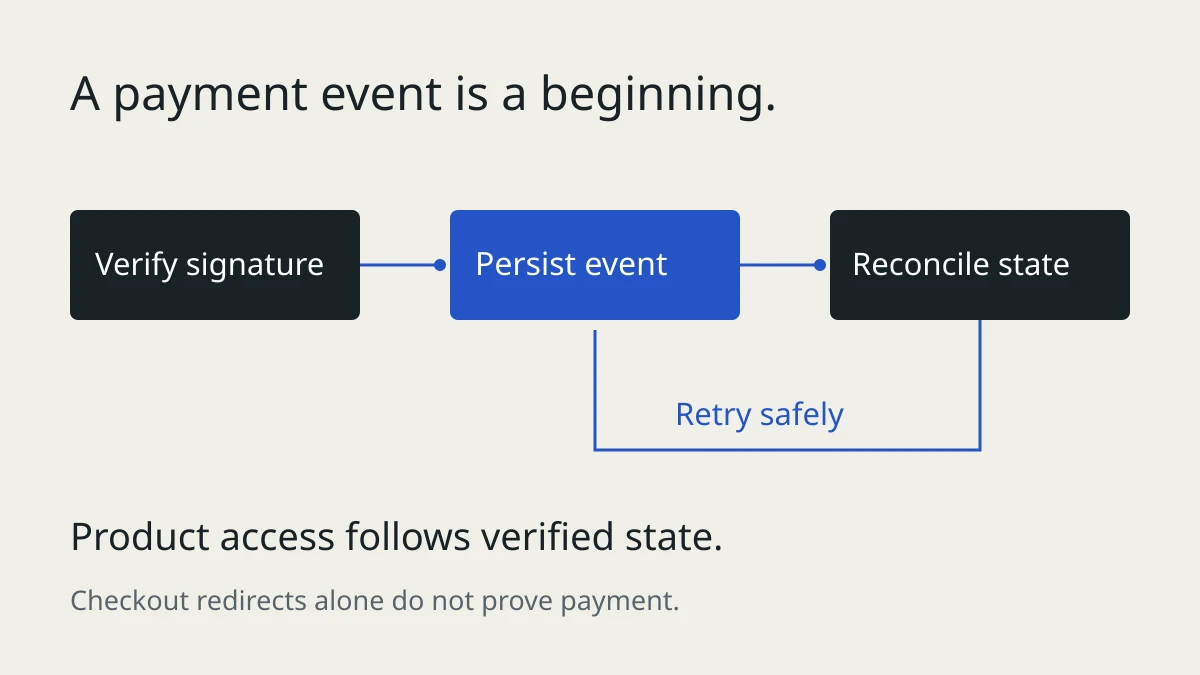
Do not equate a completed checkout redirect with paid access. The customer can close the browser before returning, and some payment methods complete asynchronously. Use server-verified billing state. Stripe’s subscription lifecycle documentation explains the relationship between invoices, payment and subscription status.
Keep billing state and product permissions separate
Stripe owns the billing objects. Your application owns the relationship between those objects, your organizations and their permitted actions. Keep a local projection so every ordinary product request does not depend on a billing API call.
A useful starting inventory is:
| Record | Purpose |
|---|---|
| Customer and subscription IDs | Map billing objects to the correct organization |
| Subscription and price state | Identify the current commercial arrangement |
| Relevant period and cancellation fields | Support renewal and end-of-period behavior |
| Access policy or entitlements | Decide which product operations are allowed |
| Event processing records | Track receipt, retries and completion |
| Last reconciliation time | Help operators identify stale projections |
This is an illustrative inventory, not a universal six-column schema. Read field locations from the API version pinned by your integration. Do not assume a single price or billing period fits every product model.
Accept an event durably before acknowledging it
The receiving endpoint and the worker have different responsibilities. The endpoint verifies the signature using the raw request body, records or queues the event durably, then returns promptly. The worker carries out processing and records the outcome.
Deduplicate concurrent receipts with a unique event identifier. Distinguish “received” from “completed”: marking an event processed before its effects succeed can lose work after a crash. Failed work must remain retryable. A queue acknowledgement should follow successful processing, and notifications need their own duplicate protection.
Stripe documents duplicate deliveries, unordered events and signature requirements in its webhook guide. These behaviors belong in the implementation’s tests, not just a comment above the handler.
An illustrative processing sequence is:
- Verify the incoming event.
- Store an event record, using a unique key to handle repeated receipt.
- Return success after the work is durably accepted.
- Let a worker reconcile the affected subscription.
- Commit the projection and processing result consistently.
- Retry failed work and alert on jobs that remain unresolved.
Build an event matrix for your integration
There is no universal four-event implementation. Select the events that maintain your product’s supported lifecycle and document the expected response. This example shows common concerns, not an exhaustive list:
| Signal | Application decision |
|---|---|
| Checkout completes | Link the verified billing objects to the authenticated organization; evaluate payment and subscription state |
| Invoice is paid | Reconcile paid access and the applicable period |
| Subscription changes or ends | Refresh plan and cancellation state; enforce the agreed access policy |
| Payment fails or needs action | Tell the customer what to do and apply the documented recovery policy |
| Invoice cannot finalize | Investigate why collection cannot proceed |
| Entitlements change | Refresh feature access if the product uses Stripe Entitlements |
Trials, pauses and asynchronous payment methods can require additional events and behavior. Check Stripe’s subscription webhook reference against the flows you actually support.
Reconcile without creating a race
Fetching the current subscription can reduce dependence on old event payloads, but it does not automatically make concurrent workers safe. Two workers can fetch at different times and commit in the opposite order. Serialize work per subscription, use a suitable lock or otherwise control writes to the projection.
Keep a reconciliation path for missed or stuck work. It should compare local state with the authoritative billing objects, repair the projection and leave an operational record. Do not make a browser redirect the only trigger for repair.
When an operation has external side effects, a database transaction alone cannot make everything atomic. Sending an email and marking a row complete can still be interrupted between the two. Use a durable delivery record and an idempotency mechanism where the destination supports one. Decide what a duplicate would mean for the customer.
Design the recovery experience
Specify the actual retry settings and access policy in the product. Avoid copying a universal “day 3, day 10, day 14” schedule: recovery behavior depends on configuration and business needs.
Give the customer a clear billing status, a route to update payment details and an explanation of any restriction. Separate temporary payment recovery from permanent cancellation. Preserve support access when that helps the customer resolve the problem.
Evaluate the hosted Customer Portal before building custom billing settings. It can reduce the surface you maintain, but it does not decide your application permissions or satisfy every product requirement. Test the portal configuration and the webhook effects together.
A release rehearsal a founder can witness
Ask the developer to demonstrate these scenarios in a sandbox. For each one, check the visible message, stored billing state and actual feature access:
- Initial payment succeeds, fails or requires authentication.
- The user closes checkout before returning to the application.
- A renewal fails and later recovers.
- A subscription is canceled at period end and cancellation is reversed.
- An upgrade or downgrade applies the intended pricing and timing behavior.
- The same event is delivered twice, including concurrently.
- Events arrive out of order and the worker restarts during processing.
- The billing API or database is temporarily unavailable.
- An operator reconciles stale state without creating duplicate effects.
Stripe’s Billing testing guide covers sandbox subscriptions, test clocks and test events. Use correlated test subscriptions for lifecycle tests; an isolated synthetic event is not proof that the complete flow works.
What a billing review should deliver
A useful review produces an access matrix, supported-event inventory, failure-path results and a short list of changes ranked by customer impact. It should identify ownership of stuck events and reconciliation, so the next incident has a clear recovery path.
If you need this applied to an existing product, see my Stripe subscription development service. Describe the billing flow you want reviewed, including the payment methods, subscription model and the problem your customers see. Never include secret keys or customer payment details in the initial message.
Need this built?
These services can turn the ideas in this article into production software.